

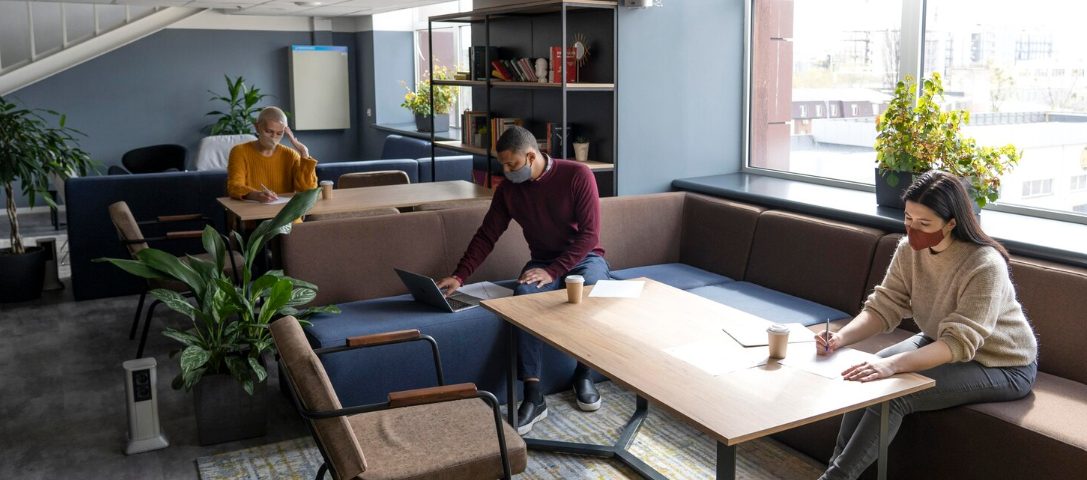
The most useful coworking amenities are reliable internet, comfortable workstations, quiet areas, private meeting rooms, secure access, and clean shared facilities. These features support everyday work, while extras such as snacks or fitness rooms depend on personal preferences and attendance habits.
Start with the equipment you will use for hours. OSHA’s workstation evaluation checklist highlights adjustable chairs, proper screen positioning, lower back support, and adequate legroom. A furnished office should offer more than attractive furniture; the setup needs to fit the person working there.
Before booking a tour, list your three nonnegotiable amenities. Then bring that list along and test each requirement in person.
Amenities That Are Must-Haves Rather Than Nice-to-Haves
Treat anything necessary for completing your work as essential. Reliable connectivity matters for cloud-based tasks, private rooms matter for client conversations, and suitable desks matter for extended computer use. Rank amenities according to your responsibilities rather than the length of the provider’s feature list.
When comparing options such as Cue's coworking space in Dallas, check which amenities belong to your specific membership and location. Meeting room credits, printing allowances, parking, and access hours can differ between plans. Ask for written details before deciding whether the package meets your needs.
Will the Desk and Chair Support Your Workday?
Look for adjustable seating, sufficient desk depth, and outlets within reach. Sit down with your laptop open and check whether the arrangement leaves room for an external keyboard, mouse, and any second screen you normally use.
Check glare at the time you expect to work. A window seat can become uncomfortable when sunlight reflects across your display. Ask whether blinds, task lighting, monitor stands, or alternative seating are available when conditions change during the day.
Can You Concentrate While Other Members Take Calls?
Look for separate areas for focused work, conversation, and phone calls. A single open room creates competing expectations when one member needs silence, and another spends the afternoon speaking with clients. Clear noise rules and staff follow-through are as valuable as the room layout.
Are There Enough Phone Booths When You Need One?
Check availability during busy hours, booking limits, ventilation, and sound privacy. One attractive booth provides little value if members routinely occupy it for long stretches. Ask where you would go for an unexpected call when every booth is already in use.
For scheduled presentations, inspect meeting room equipment separately. Test the camera, microphone, display connections, and seating capacity. Confirm whether guests can join the network easily and whether someone can help with technical problems before an important appointment begins.
Is the Internet Reliable Enough for Your Actual Work?
Judge connectivity by a realistic task, not a speed claim on a brochure. Try a video call, upload a representative file, and open the applications you use daily. Test from the seat you would occupy, since wireless performance can vary across the building.
Many technology amenities in shared office spaces center on connectivity, meeting equipment, and access to useful hardware. Prioritize the tools your work requires and verify their availability, compatibility, and cost before paying for more advanced features.
Ask whether the operator has a backup connection and how service interruptions are handled. Check for wired connections if your work requires them. Employees should also confirm that the network arrangement meets their organization’s security requirements before connecting work devices or handling sensitive information.
For shared printers and scanners, check device compatibility and how confidential documents are released. Ask whether printing requires a personal code and whether scanned files remain on the equipment. Confirm supply availability and support procedures, especially if printed proposals or signed paperwork form part of your regular client work.
What Should a Shared Kitchen Actually Include?
A useful kitchen needs drinking water, clean food preparation surfaces, adequate refrigeration, and clear cleanup expectations. Coffee is convenient, but reliable access to basic facilities matters more when you spend full days in the office. Check whether equipment is clean and working during your visit.
Ask about refrigerator labeling, dishwashing, food disposal, and replenishment schedules. Look for a break area separate from concentration zones so meals and conversations do not interrupt nearby work. Check restrooms too, including accessibility, supplies, and cleaning frequency throughout the working day.
Everyday Conveniences Are Worth Paying For
Pay for conveniences that remove recurring difficulties: secure storage, dependable building access, practical parking, printing, and responsive onsite support. Their value depends on your routine. Someone carrying equipment daily has different priorities from a consultant who visits twice monthly for client meetings.
Check the route from the entrance to your desk, meeting rooms, and restrooms. Confirm that elevators and accessible entrances remain available during your intended hours. Bike storage or showers deserve consideration if you commute actively, while convenient visitor parking matters when clients attend appointments onsite.
Do Access Hours and Storage Match Your Schedule?
Confirm whether extended access applies to your plan, how entry works outside staffed hours, and whom to contact if credentials fail. If you leave equipment overnight, ask about lockers or lockable offices. Review mail handling rules if you expect business correspondence or deliveries.
Build a sample monthly bill that includes parking, printing, room bookings, and guest charges. Before joining, spend a trial day completing normal tasks. Keep the amenities that prove useful and question any added cost for features you are unlikely to use regularly.
Choose the membership only after every essential feature passes your trial. A longer amenities list cannot compensate for recurring problems with the facilities your job requires daily.
Frequently Asked Questions About Coworking Amenities
What Facilities Usually Come With a Coworking Membership?
Common inclusions are a workspace, internet access, shared restrooms, and kitchen facilities. Printing, private rooms, mail handling, and extended access vary by operator and plan. Request an itemized list showing included services, usage limits, and additional charges.
Can You Use the Amenities With a Single-Day Pass?
Often, yes, but a day pass usually has narrower access than a monthly membership. Confirm which seating areas, refreshments, and facilities are included. Meeting rooms, storage, and entry outside staffed hours can require separate payment or a different plan.
Do Coworking Locations Have Private Offices?
Many offer lockable private offices alongside shared desks, but availability and equipment differ. Check sound privacy, occupancy limits, included furnishings, and meeting room allowances. A private office inside a shared facility still comes with common areas and building rules.
How Do You Reserve a Meeting Room?
Operators commonly accept reservations through an app, member portal, or staff team. Ask about booking windows, cancellation rules, hourly rates, and included credits. Confirm the room’s equipment and guest capacity before scheduling a meeting that depends on either.



1 thought on “What Amenities Should You Look for in a Coworking Space?”
Comments are closed.