Introduction
Racing on a single monitor works, but it limits what you can see. When a car pulls alongside you, a single screen cannot show it until it is almost in front of you. Many sim racers move to three screens for that reason, and the next question is how to hold them.
This guide explains how triple monitor setups work, what to look for in a stand, how to position the screens and which mistakes beginners tend to make.
What a triple monitor setup is and why people use it
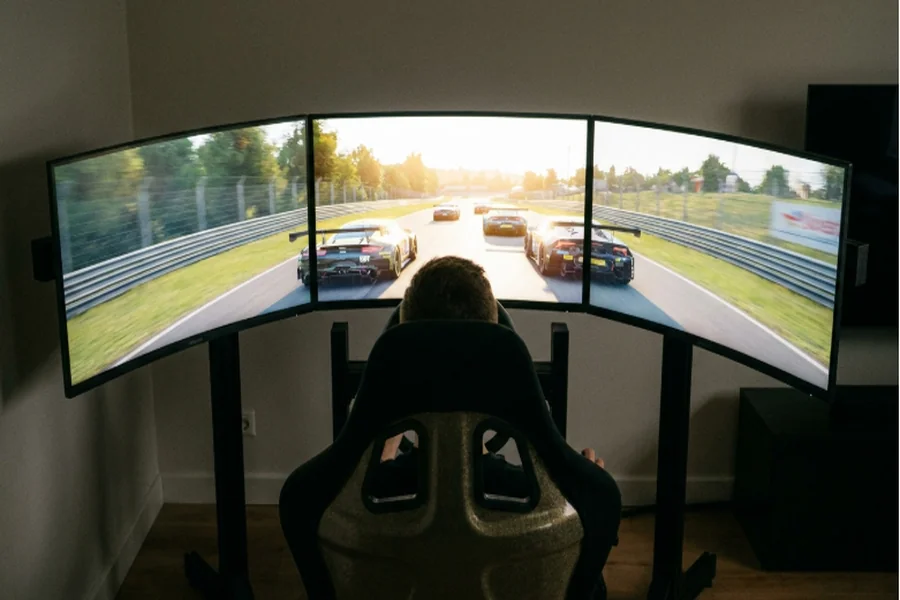
Triple monitor stand setups put one monitor in front of you and one on each side, angled inward so the three form a curve around your seat. The side screens fill your peripheral vision, which gives you a better sense of speed, other cars and the corner you are about to take.
The benefit shows up most in close racing. You can see a car at your door, judge the apex of a corner by looking through it and feel more placed in the car. It also suits games with wide cockpits, where the side windows matter.
Before you go further, look at the stand, because a good one turns three monitors into a single setup.
Why the stand matters
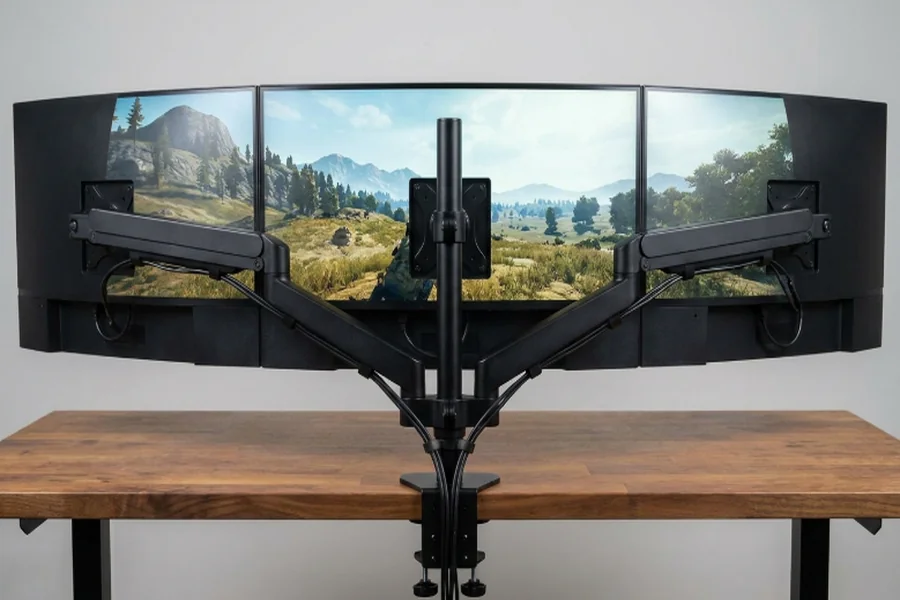
Triple monitor stand setups hold the three screens in a fixed arrangement so they stay at the same height, the same distance and the same angle every session. Without a proper stand, three monitors on a desk drift apart, wobble when you brake and never quite line up.
A stand also frees the desk or floor space around your rig. Instead of three bases on a table, the screens sit on one frame, and you can move your seat closer to the screens without anything getting in the way.
The main choice is how the stand attaches. Some mount to the cockpit frame and move with it. Others stand on the floor in front of the rig. Both can work, so it comes down to your space and how you plan to use the rig.
Types of triple monitor stands.
A floor-standing stand sits on its own feet in front of the cockpit. It is independent of the frame, which means vibration from the wheel base does not shake the screens. It does take floor space, and you need to keep it clear of the seat as you slide in and out.\
A cockpit-mounted stand attaches to the rig itself, so the screens and the seat move as one. This keeps the distance between you and the screens consistent. It adds load to the frame, so check that the frame is built to carry three monitors.
Whichever type you choose, look for a stand with wide adjustment, because you will want to fine-tune the angles after you set it up.
Checking monitor size and weight
Every stand has limits, and your monitors need to fit inside them. Check the maximum screen size the stand supports, the maximum weight for each arm or position and the mounting pattern on the back of your monitors.
Most monitors use a standard mounting pattern, but not all of them do, and some thin or curved models need an adapter. Look at the back of your monitors, or the manufacturer’s information, before you order the stand.
It is easiest to use three identical monitors. Matching screens have the same size, brightness and colour, which makes the picture look like one wide display. Mixed monitors can work, but the differences show at the edges of the screen.
Screen size affects how far back you sit. Larger screens need more distance to keep the picture comfortable, so measure your space before you decide.
Positioning the screens
Start with the centre screen. Set its top edge at about your eye level, so you look slightly down at the middle of the image. Place it at a distance where you can see the whole screen without turning your head.
Then add the side screens. Angle them inward so each one faces your seat, forming a curve. The goal is for the edges of the three screens to meet with as little gap as you can manage, and for the side screens to be at the same distance from your eyes as the centre one.
If the angle is too flat, the side screens look stretched and distant. If it is too sharp, they crowd you. Adjust a little at a time and check the picture in the game.
Most racing games have settings for triple screens and field of view. A correct field of view matches the real angle of the screens from where you sit, which makes distances and speed look right. Take a few minutes to set it, since it changes how the whole setup feels.
Space, cables and your computer
Three monitors take more room than one. Measure the width of the full setup, including the side screens when they are angled, and check that it fits your room with space to get in and out of the seat.
Cables are easy to forget. Each monitor needs power and a video connection, and the cables have to reach from the stand to the computer without hanging in front of your feet. Plan the route and allow some extra length so you can adjust the stand later.
Your computer needs to handle three screens as well. It needs enough video outputs for all three monitors, and its graphics card has to run the game across a much wider picture. Running three screens asks more from the card than one, so check that your computer can manage it, and lower the settings if the game stutters.
Choosing a stand
Compare stands on stiffness, adjustment and fit. A rigid stand keeps the screens steady when you brake and turn. Good adjustment lets you set the height, the distance and the angle of each screen. Fit means it takes your monitor size and weight with room to spare.
Think about how the stand attaches to your cockpit, if you have one, and check that the mounting points match your frame. Ask whether it can grow with you, for instance, if you plan to change monitors later.
Mistakes beginners make
The most common mistake is buying monitors before choosing a stand. Check the stand’s limits first, then pick screens that fit it.
Another is setting the side screens too flat. It feels fine at first, but the picture looks stretched, and the benefit of three screens is lost.
Some people forget about the graphics card until the game runs poorly. Check your computer first so the extra screens help rather than hurt.
Finally, people skip the field of view setting. Without it, the image looks wrong, and the cars look too small or too far away.
Getting started with three screens
Pick a stand that fits your monitors and your space, set the centre screen first, angle the sides inward and set the field of view in your game. Check your cables and your computer before the first session, and adjust a little at a time until the picture looks right.
Frequently asked questions
Do I need three identical monitors for a triple screen setup?
It is not required, but identical monitors give the best result. They match in size, brightness and colour, so the picture looks like one wide display.
Can I mount triple monitors on my sim racing cockpit?
Many people do. A cockpit-mounted stand keeps you and the screens at a fixed distance. Check that your frame can carry the weight of three monitors, and follow the manufacturer’s guidance.
Will my computer run three screens?
It depends on your graphics card and its video outputs. Check that it can connect three monitors, and expect the game to ask more of it than a single screen does. Lower the settings if it stutters.