

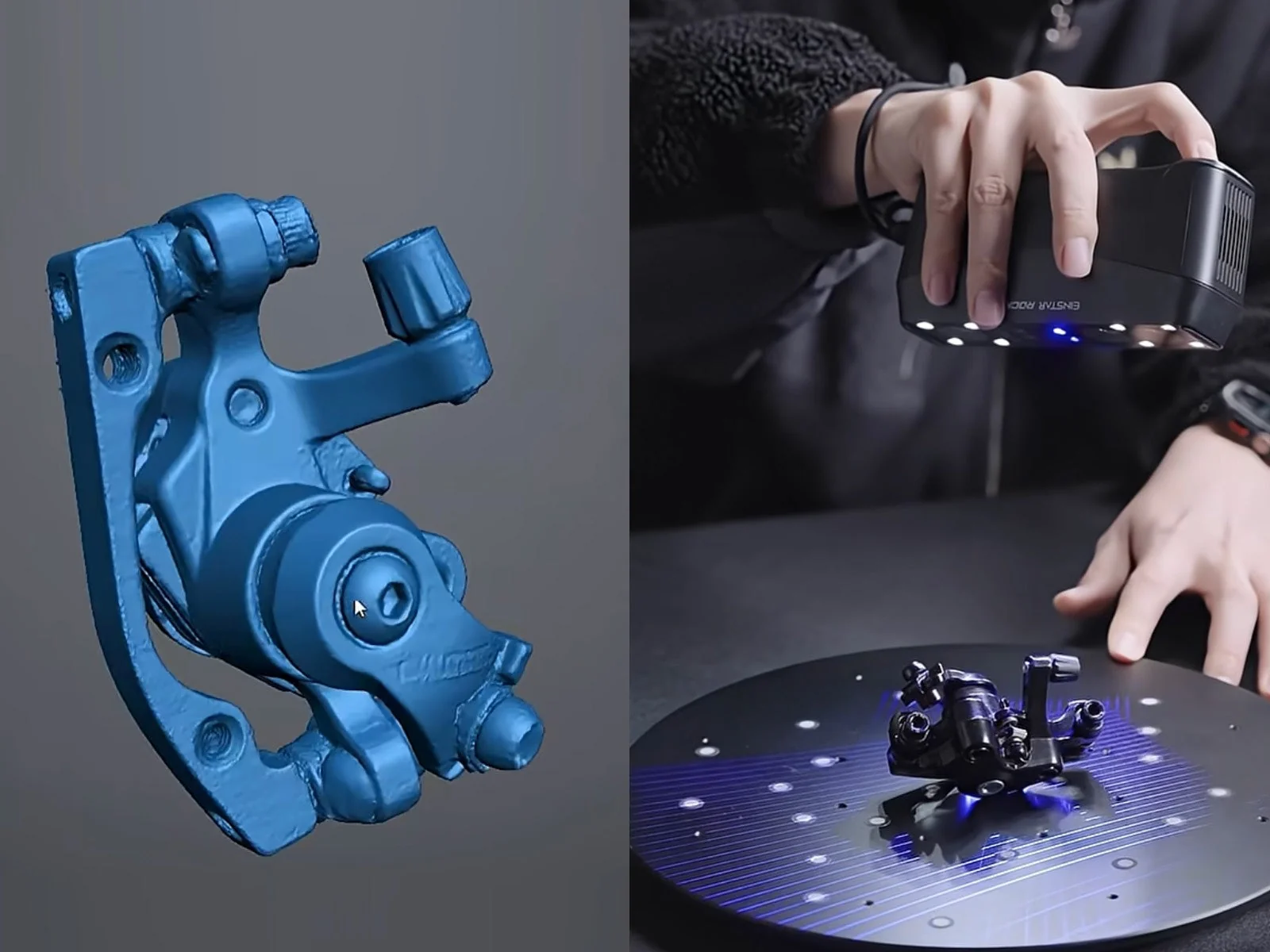
There is a particular frustration that many makers and designers eventually run into: you have the physical object in front of you, you know exactly what you want to change, but there is no digital model to work with. Rebuilding the entire object manually in CAD software can take hours. Measuring every curve, hole, edge, and irregular surface adds another layer of work. For complicated parts, even a small measurement error can force several rounds of revisions.
A 3d scanner for printer offers a different starting point. Instead of recreating an existing object entirely from measurements, you can capture its geometry digitally and use that information as the foundation for further design work. This approach becomes especially useful when scanning is connected with CAD modeling.
From a Physical Part to Usable Digital Data
The basic idea sounds simple, but the process involves several stages. A scanner captures the visible geometry of an object from different angles. The collected information is combined to produce a three-dimensional representation. Depending on the scanner and software, the result may be a point cloud, mesh, or another type of digital model. At this stage, the scan is not necessarily a finished engineering design.
It is better to think of it as a detailed digital record of the physical object. That distinction matters because the next step may involve cleaning the data, checking dimensions, removing unwanted areas, or rebuilding certain features in CAD software.
Where Scan to CAD Enters the Picture
The term scan to cad describes a workflow in which information captured from a physical object is brought into a computer-aided design environment. This can be useful when an existing component needs to be redesigned, measured, or reproduced.
For example, imagine a workshop has an older machine component but no original CAD file. Rather than beginning with an empty document, the team can scan the component and use the resulting data as a reference. From there, an engineer may recreate important surfaces, establish dimensions, add mounting features, or redesign selected sections. The scanner does not replace CAD expertise. Instead, it gives the designer a much more informative starting point.
Why This Matters for 3D Printing
The connection between scanning and printing becomes particularly interesting when a physical object needs to be reproduced or modified. A typical project might look like this:
Physical object → Scan → Digital cleanup → CAD adjustments → Printable model → 3D print
Each stage has its own purpose. The scan captures the existing shape. Cleanup improves the digital data. CAD software provides control over dimensions and design changes. Finally, slicing software prepares the finished model for the printer. This combination gives creators considerably more flexibility than relying on either scanning or printing alone.
When Starting From an Existing Object Makes Sense
Not every project requires scanning. If you are designing something completely new with simple geometric features, traditional CAD modeling may be faster. Scanning becomes more attractive when the starting point already exists physically. Consider objects with:
- Organic curves
- Irregular surfaces
- Complex contours
- Multiple intersecting features
- Worn or handmade shapes
Trying to describe these forms entirely through manual measurements can be tedious. A scan captures the overall geometry first, allowing the designer to concentrate on the changes that actually matter.
Accuracy Still Depends on the Workflow
It is tempting to assume that a digital scan automatically means perfect accuracy. In reality, the quality of the final result depends on several factors. The object's surface, scanning technique, lighting conditions, tracking, scanner capabilities, and software processing can all influence the captured data.
The user also has an important role. A careful scan usually involves moving around the object systematically and making sure important areas are captured from suitable angles. Afterward, the digital model should be inspected before it is used for precision work or manufacturing. For applications where exact dimensions matter, measurements should be verified rather than blindly trusting the first scan.
A Practical Advantage for Replacement Parts
Replacement parts are a good example of where this technology can save substantial effort. Suppose a plastic cover, bracket, or enclosure breaks, but the manufacturer no longer produces it. The original component may still be available, even though its digital design file is nowhere to be found. Scanning can turn that physical reference into useful digital information.
A designer can then adjust the model to account for mounting points, material thickness, or improvements before producing a replacement. This is particularly helpful for older equipment, custom machinery, and one-off projects.
Choosing Equipment for the Job
The right scanner depends heavily on what you intend to capture. Someone scanning small components may prioritize fine detail and accuracy. Another user working with furniture, vehicle parts, or larger assemblies may care more about scanning range and portability. Software is equally important, especially if you plan to scan to cad for further design or engineering work. A scanner that produces useful data but does not fit comfortably into your existing design workflow can create unnecessary complications.

EINSTAR is one option users may encounter when exploring portable 3D scanning solutions, particularly when they want to combine physical capture with broader digital design work. The key is to evaluate the complete workflow rather than choosing hardware based on a single specification.
What Happens After the Scan?
Once the digital model has been created, the project does not necessarily end there. Depending on the intended result, you might:
- Remove unwanted scan data.
- Repair holes or incomplete areas.
- Check critical dimensions.
- Import the model into suitable design software.
- Rebuild precise features where necessary.
- Modify the geometry.
- Export a printable version.
- Test the first physical prototype.
This iterative process is one of the biggest strengths of combining scanning with digital manufacturing. The first print does not have to be perfect. It can reveal fit issues, thickness problems, or other details that can be corrected in the digital model before another version is produced.
A More Flexible Way to Design
Perhaps the biggest advantage is not simply speed. It is flexible. A physical object can become a reference point for new ideas instead of being a limitation. Designers can preserve its useful geometry while changing the parts that no longer meet their needs.
That makes scanning valuable for restoration, customization, prototyping, education, and small-scale manufacturing. As scanning hardware and software continue to improve, the distance between an object sitting on a workbench and a usable digital design is becoming shorter.
Conclusion
A 3d scanner for printer can be an important link between the physical world and digital manufacturing. Rather than rebuilding an existing object from scratch, users can capture its geometry, refine the resulting data, and develop a model suitable for further design or production. The scan to cad process adds another layer of usefulness by allowing physical references to become part of a controlled digital design workflow. Whether the goal is reproducing a discontinued component, modifying an existing product, or developing a prototype, scanning can provide a practical starting point. With the right equipment, software, and verification process, this technology can make complex design tasks more manageable while opening new possibilities for 3D printing.
FAQs
Can a 3D scanner create a CAD model directly?
Some scanning workflows can produce data that works with CAD software, but a raw scan is not always the same as a fully editable CAD model. Additional processing or feature reconstruction may be necessary.
Is scan to CAD suitable for reverse engineering?
Yes. It is commonly useful as a starting point for reverse engineering because scanned geometry provides a reference for rebuilding or modifying an existing component.
Can any 3D scanner be used for printing?
Not every scanner is equally suitable for every printing project. The appropriate choice depends on object size, required detail, accuracy, surface characteristics, and the intended print.
Does a scanned model always need editing?
Not necessarily. Some scans may require very little adjustment, while others need significant cleanup or remodeling before they are ready for manufacturing.





1 thought on “Turning Physical Objects Into Digital Designs: How 3D Scanning Fits Into Modern Printing”
Comments are closed.